
MIXING PROCESS:
Catching Snowflakes
In this section I discuss how I approached the mix for Catching Snowflakes, and I make reference to a few other techniques I used in different sessions.

1: DISCUSSING INSTRUMENTATION
As I was mixing on my little 8GB MacBook Pro, who struggles to breath with more than two google tabs open these days, I was having some CPU overloading issues while trying to run 3 different instances of AnalogLab. To decrease the overall CPU usage, I recorded each MIDI instrument out into 3 new audio tracks, as shown below.

My instrument names probably don’t seem very clear outside of my own mind, so before I launch into a more detailed description of the mixing process, I’ll start with an overview of what each Audio Track is and what it is doing in the mix. (In case it isn’t obvious, Audio Tracks with ‘MIDI’ in the name were once MIDI Instruments).
ARP MIDI
This was created in AnalogLab using an arpeggiator calling Simplicity. It occupies the high-end of the piece, adding some air and ‘sparkle’ to the mix.
CHORDS MIDI
A piano-led synth from AnalogLab; this instrument plays the main chord progression from verse 1 onwards.
MELODY MIDI
A synthesised blend of piano and strings, which introduces the piece with a gentle attack and release, and uses a descending scale further on in the mix to suggest snowfall.
SNOWFLAKE
Snowflake is named as such because it reminds me of the sharp icy feeling of snow landing on your face. I used EQ and phasing to mould this sound from the original Chord Arp instrument.
CHORD ARP
This instrument evolved from the ‘Snow Peaks’ pad in AbletonLive10. It has a rhythmic element to it and helps to drive the piece.
GLACIER
Named for its originating instrument in Ableton, Glacier has a distant and ethereal sound. It sits far back in the mix, contributing to the overall atmosphere and stereo width.
SEASHORE
Seashore is a slowly evolving synth that has a string-type sound to it. Its envelope fades different elements in and out at different stages, with a long attack and quick release creating the ‘swooshing’ sensation of a moving tide.
VOCAL EDITING
The first step I take towards processing vocals is to remove breaths and room noise where needed, and adjust individual clip gain to help control the vocal dynamics. I also put longer fades on phrases beginning or ending in ‘S’ to help reduce the sibilance too. You can see where I’ve done this in the third image of the slideshow below.
For this mix, I then listened to the vocal takes in context with the music and click track to make sure everything was in time and that it fit the arrangement well. I did the same thing for a second vocal track and then brought it in line with the first vocal to use as a double track. You can see the difference between the unedited vocal takes and the final, chopped up audio files in the first 2 images of the slideshow.
The 4th image is of the RX8 Mouth De-Click, a piece of software I used within Audiosuite to reduce the lip smacks and clicks to make for a smoother listening experience.
Finally, I applied some EQ to the vocals (image 5), concentrating on reducing muddiness in the low-mids, and bringing the vocals forward in the mix with a wide boost at 1.5kHz.

ORIGINAL VOCALS

EDITED VOCALS

VOCAL EQ
ORIGINAL VOCALS
INSTRUMENT EQ
I listened to each instrument track both in solo and in the context of the mix, so that I could get a sense of what sounds and layers would occupy which areas of the frequency spectrum.
For example, these two images demonstrate the EQ applied to the MIDI ARP track, and to the MIDI CHORDS track. While the Hi Pass Filter on the ARP track is higher up to bring clarity and reduce low-end muddiness, the HPF on the CHORD track is sitting slightly lower at 150Hz, with a 5dB resonance boost adding some weight and thickness, and bringing out the punch of the instrument’s attack.

ARP MIDI EQ

CHORD MIDI EQ
ARP MIDI EQ
PANNING
As I’m taking an immersive approach to this project, wide panning has been used for a lot of stereo instruments and the vocals themselves are often double tracked and panned left to right. For example, in this mix they are panned 20 degrees left and right – enough to add width without losing them as a central, focal point of the mix.
I used panning automation for several instruments, such as SEASHORE and SNOWFLAKE; where I wanted to generate movement across the stereo image so the mix wouldn’t be so static.
As shown in the image below, the automated panning for SEASHORE, which is a gentle, swaying synth sound, allows the audio to fluctuate in width as well as in position; the automation also moves with the rhythm of the piece to reflect the idea of a tide moving in and out.

FIELD RECORDING
You’ll remember from the “Field Recording” Blog that me and Noah made crunchy snow sounds using a pillowcase stuffed with cornflour and rice. I imported this unedited audio file in to the session so that I could listen to it in full, and start isolating sections that would be useful for this piece. I hadn’t actually expected to use the first section of the take where Noah is talking, but it felt like a nice, organic introduction to the piece and really captures that sense of wonder and delight that we explore in the poem.
Once I’d chosen the sections I liked and arranged them throughout the piece, I used RX8’s De-Hum in Audiosuite to remove some background noise. EQ helped as well, with a HPF set at 200Hz combatting the mic’s sensitivity to handling and proximity. Field recording is something I generally need more practice with, and this project has taught me a lot when it comes to being careful of handling noise, background noise, and also the trick of saying what you’re recording at the beginning of each take, so that when it comes to editing it’s not just a mysterious 10 seconds of rustling before you finally figure out what you’re listening to!
Anyhow, with the processing plug-ins I have available to me, and with some careful volume automation, I’m pleased with the overall effect the ‘crunchy snow’ audio has on the piece.
COMPRESSION
Even after all these years of recording and mixing, it still takes me a while to figure out exactly what it is I want a compressor to do for a mix.
I took a gentle compression for most of these sessions – very few (none) required a pumping bass or a completely crushed kit; it was mainly used to control vocal and instrument dynamics, and to either preserve or soften the attack on keys and percussion instruments.
In the screenshot below of my vocal compressor, you can see that there’s only a 1.8:1 ratio applied, using a soft knee to gently even out the transients and bring up the quieter vocals to meet the louder parts. I then used a De-Esser, a compressor specifically designed to control vocal sibilance. After this I often use a third compressor to just catch the peaks of the transients, but after manually adjusting the clip gain of the loudest peaks I didn’t think it would necessarily bring much more to the vocals, and I wanted to preserve the energy of the take.

PARALLEL COMPRESSION
Despite my largely gentle approach, I actually did use heavy compression in this mix, in the form of parallel compression for the CHORD ARP track to help add weight and energy to the mix. Up to -30dB of compression is applied at a 10:1 ratio in the auxiliary bus track, and you can see in the screenshot below that while I’m sending a consistent 0dB of signal to the compressor, I’ve automated the compressor volume so that the presence of the ‘pumping’ sound fluctuates, contributing to the build and release of energy throughout the piece.

PARALLEL COMPRESSOR
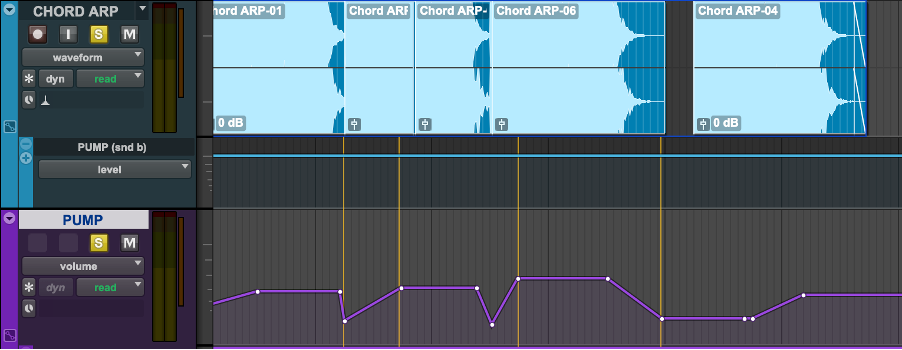
COMPRESSOR VOLUME AUTOMATION
MIX BUS PROCESSING
Throughout the mixing process, I used a combination of FX plug-ins to help add life and space to each poem; leaning heavily on reverb, delay and tape saturation for that warm, organic feel I’m aiming for.
REVERB
For most sessions I used both a mono and a stereo Auxiliary Bus to introduce reverb to the mix. I did this because I found that using too much stereo reverb on vocals made them sound muddy and distant, and yet not enough left them feeling kind of separate from the pack. Using a combination of the two; a mono plate reverb on the vocals and whatever dramatic large cathedral reverb I slapped on the rest of the mix (in the case of Catching Snowflakes, I went for a convolution reverb in Space called “Church Buiksloterkerk”), allowed the voice to retain its definition while still occupying depth in the stereo image. It’s a delicate balance between that and having the ‘room inside a room’ effect that two reverbs can sometimes have.
There’s no automation on the reverb plug-ins for this mix, but I did use it at particular instances throughout the project; for example extending the reverb tail, and increasing the amount of signal being sent to the reverb bus, while simultaneously decreasing the audio track's volume gave the effect of the audio ‘disappearing’ into the reverb. I think my use of this effect can be heard best on I Struck Gold and You’ve Got a Friend In Me.
DELAY
Similarly to reverb, I often use a combination of stereo and mono delays to introduce different layers of depth and distance to the mix, with a slapback delay being a favourite of mine for vocal tracks. However, for this mix there’s only one stereo delay bus, and I only sent the vocals to it.
I used two instances of ModDelayIII on the same auxiliary bus track; let's call them Delay 1 & 2. I decided to use modulated delay in this mix to give it a more ethereal, magical sound. Delay 1 is a ‘Slap Spread’ delay, which uses a short delay time and small feedback amount to add some width and thickness to the vocals. The Delay 2 preset is called ‘Spaced’- I adjusted it to match the tempo of the mix and increased the feedback amount so that the vocals would gently repeat and fade out. I used it subtly throughout the mix, increasing the signal sent to emphasise specific words (e.g. ‘ghostly glitter’). I also introduced a Hi Pass Filter in the final verse to gradually roll off all frequencies below 8kHz, which added air, presence and a sense of elevation to the outro.
PHASER
Phasers are not something I use in my everyday mix kit, but I found that sending the ‘SNOWFLAKES’ instrument out to a long, sweeping mono phaser created a gentle swooshing and swirling effect that suited this piece.
LOFI
Finally, I introduced some tape saturation by bussing a small amount of signal from each track to an aux track with the Lo-Fi plug-in inserted. This plug-in has a pre-set called “tape saturation” which dials in a small amount of distortion and saturation to add a subtle warmth and energy to the whole mix.
MASTERING FOR ONLINE STREAMING
THE NUMBERS BIT:
All final masters will be delivered in the file format 16-bit 48kHz .wav, at 256kbps AAC.
REFERENCES
After importing all of my final mixes into a ProTools Master session, I then imported some reference tracks from The Lost Words: Spell Songs, including Heartwood and Little Astronaut. I brought these tracks down (by ear) until they had roughly the same loudness as the tracks I had yet to master in order to have a fair comparison.
When comparing the references with my mixes, I noted my mixes sounded a lot rounder and woofier; and was lacking vocal definition and crispness in the upper-mids.
To take Chasing Cars as an example, I began with a 7-band EQ to make some very subtle changes such as:
- a 2dB cut around 220Hz to clean up low-mids and reduce the woofiness of the mix
- a wide, 1dB lift at 1.17kHz added more life and presence to the vocals
- a 1.5dB cut at 2.8kHz to reduce harshness in the upper mids
- a 1dB shelf at 8.5kHz to emphasize sizzle and air in the high-end
DYNAMIC COMPRESSION
Next, Pro Multiband Compression allowed me to gently smooth out the mid-range and tame the hissing from one of the pads I’d used in the mix that I’ve realised is a bit harsh. Compression in the upper mids to give 2dB of gain helps add clarity and dynamic control to the vocals and keys, while light compression in the low-end is used with a depth of -2.5dB to tame muddy, flapping bass signals.

LIMITING
Finally, I used a Klanghelm VU Meter plug-in on the master track to use as a meter while using Maxim limiter on the mix track to bring up the overall loudness. I used -10dB as an average volume mix to achieve a loud yet dynamic master. In the limiter, I set the ceiling to -1dB to give some headroom in case further processing to mp3 adds extra volume. I then brought the threshold down until I start to see some attenuation and the VU meter is sitting at around 0 (i.e, showing an average volume of -10dB).

MIX AND MASTER EVALUATION
Throughout the mixing and mastering of this project I feel I have progressed my knowledge of both sciences and endeavour to improve my abilities with future projects.
There are elements of the mastering process I still feel apprehensive about, such as the use of multi-band compression, codec and dither.
When it comes to mixing, I would like to keep practicing and keep refining my skills as I feel they are still very much developing. I am pleased with my vocal processing and control of FX, EQ and compression in most mixes, but I feel I could improve my use of EQ and compression to maintain control over mid-range dynamics; some of the final mixes still sound a bit harsh here; I could strengthen this area in the future by referencing more often during the production stage and being wary of ear fatigue when making sound design and composition choices.